It is 9:20 on a Monday. A new client just signed. You log into a monitoring site with the login they texted you, screenshot the three-bureau report, then type account names, balances, and negative items into your CRM by hand so your workflows have something to fire on. Twelve minutes later the file is a day out of date, and four more clients wait.
That copy-paste shuffle is the most avoidable time sink in a small credit-repair shop, and it is where compliance slips, because the moment you touch a consumer’s report you are handling regulated data.
The answer up front: you connect credit monitoring to your CRM by having the client enroll in a monitoring service themselves, importing that report into your dispute software through a supported integration, and mapping the fields you use into workflow triggers, so a report change fires an update instead of a manual check. You never order the report for them, and you store what you pull like a bank would.
One line first: this is about operations and data plumbing, never outcomes. Nothing here disputes an item or promises a score change.
Table of contents
- What connecting monitoring to your CRM really means
- What the manual way is costing you
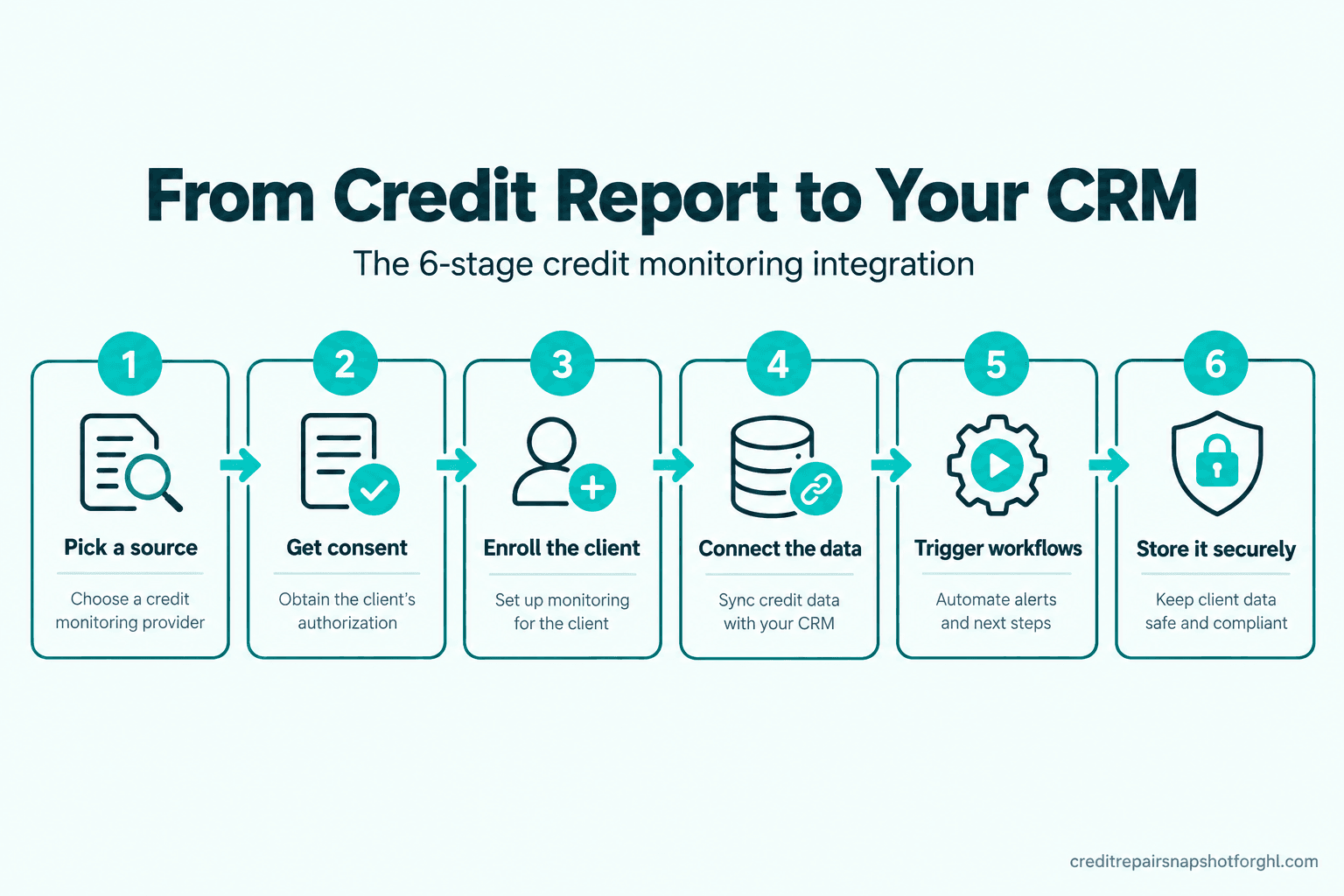
- The six-stage integration at a glance
- Stage 1: Pick a source your CRM can read
- Stage 2: Get permissible purpose and consent right
- Stage 3: Enroll the client and fund your runway
- Stage 4: Connect the data into your CRM
- Stage 5: Turn report changes into workflows
- Stage 6: Store it like a bank would
- The same integration at three sizes
- The compliance layer you cannot automate away
- Objections
- FAQ
What connecting monitoring to your CRM really means
People picture a magic button. In credit repair it is three separate data flows: the initial pull that lands the three-bureau report where you work, the change feed that flags new inquiries or a removed item after enrollment, and the client-facing view that turns that data into an update or a portal login. When the first two are clean, the third runs itself.
Your dispute software does the letters and bureau work; your CRM, usually GoHighLevel, runs everything around it, and connecting monitoring feeds that layer without a human in the middle. If your tools do not talk today, you are living the problem in why disconnected software costs a firm a workday a week.
What the manual way is costing you
Each manual pull is only minutes. The cost is in the multiplication and in what gets skipped.
It taxes every signup and freezes the data. Onboard twenty clients in a month and you have spent most of a workday in a copy-paste loop. Worse, a report you typed on day one is frozen: when a collection drops off or a new inquiry appears, nothing tells you. The whole point of monitoring is the change feed, and manual entry throws it away.
It multiplies error risk on data that is already error-prone. The FTC’s landmark accuracy study found one in five consumers had an error on at least one of their three reports, and five percent had errors serious enough to result in less favorable loan terms, based on 1,001 participants (FTC, 2013). Add your own typos and every hand-keyed digit is a second place for a mistake to enter a file you are paid to get right.
The demand is not shrinking. As of September 2025, 29.6% of U.S. consumers carried a subprime score and the average FICO score slipped to 713 (Experian, 2025). Your constraint is how fast you can take a client on.
The six-stage integration at a glance
Six stages, in order. Skip one and you feel it later, as a compliance gap or a broken import.
Stage 1: Pick a source your CRM can actually read
What it is. You choose where the report data comes from. For most shops that is a consumer monitoring service the client enrolls in, because those expose a report your dispute software can import.
How it breaks. People pick a source their software cannot read, then wonder why there is no import button, because compatibility is decided by your dispute tool. Credit Repair Cloud documents imports from Credit Hero Score, IdentityIQ, SmartCredit, MyFreeScoreNow, MyScoreIQ, and PrivacyGuard (Credit Repair Cloud). DisputeFox runs its own ScoreFusion 3B report so the pull is native (DisputeFox).
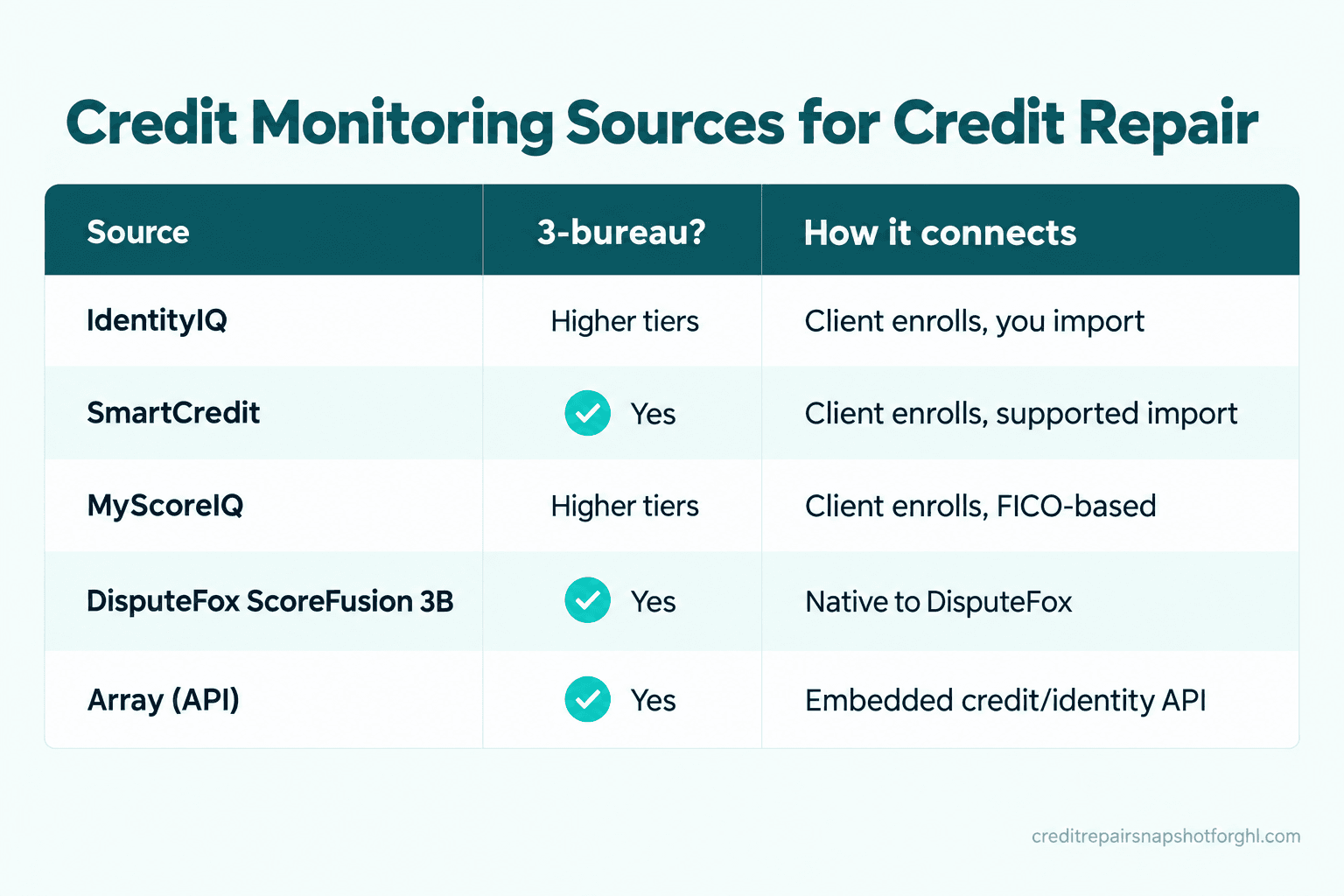
The fix. Decide on your dispute tool, then pick a source it supports. Here is how the options line up.
| Source | Three-bureau | How it connects | Best for |
|---|---|---|---|
| IdentityIQ | Higher tiers | Client enrolls, you import | CRC shops wanting a residual |
| SmartCredit | Yes | Client enrolls, supported import | A co-branded client experience |
| MyScoreIQ | Higher tiers | Client enrolls, FICO-based | Clients who want FICO scores |
| DisputeFox ScoreFusion 3B | Yes | Native to DisputeFox | DisputeFox users, one platform |
| Array (API) | Yes | Embedded credit/identity API | Firms building custom software |
For a solo operator, the honest answer is usually the service your dispute tool imports most cleanly. Still choosing? Start with our comparison of the best credit repair software for solo operators.
Stage 2: Get permissible purpose and consent right first
What it is. Before any report moves, you need a lawful reason to access it. The FCRA lets a report be furnished only for a permissible purpose, and the cleanest one here is the consumer’s own written instructions (15 U.S.C. §1681b).
How it breaks. The tempting shortcut is to order the report yourself, or to pull it on a verbal okay. Both are wrong. Monitoring providers specifically do not want credit-repair pros ordering reports for clients, which is why the model is client-enrolls-then-shares (Credit Repair Cloud).
The fix. Bake authorization into onboarding so a report is never touched before consent is on file, tied to the signed packet that carries your CROA contract. Our CROA-compliant onboarding checklist sequences this so consent comes before any data flows.
Keep that language with your signed agreement, not on a loose form. A workflow that files it automatically means the permission is never missing when you need to prove it.
Stage 3: Enroll the client and let it fund your runway
What it is. The client signs up for monitoring through your affiliate link, then shares access so you can import the report.
How it breaks. Two ways. Operators enroll the client for them to save a step, which breaks the client-enrolls rule and muddies consent. Or shops treat monitoring as a cost instead of revenue and leave the affiliate residual on the table, which matters more here than almost anywhere.
CROA prohibits charging for a service before it is fully performed (15 U.S.C. §1679b(b)), so you cannot take a big upfront fee. In the first weeks, when you are doing real work you cannot yet bill for, the monitoring commission is often your only day-one income. IdentityIQ runs a recurring commission affiliate program with white-label options (IdentityIQ), Credit Repair Cloud documents how to become a monitoring affiliate (Credit Repair Cloud), and DisputeFox’s ScoreFusion sits at a $16 per month wholesale cost you set the client price above (DisputeFox).
The fix. Send an enrollment link as a scheduled onboarding step, with a message telling the client why and that they keep the login.
If you earn a commission when a client enrolls, say so plainly in your agreement. Done openly, it is a non-issue for the client.
Stage 4: Connect the data into your CRM
What it is. With the client enrolled and consent on file, the report moves in two hops: it imports into your dispute software, and the fields you act on sync into your CRM.
How it breaks. The old way was copying a block of “source code” out of the monitoring site and pasting it, which works until a password changes or you mistype. Modern imports replace that, but they depend on current login details, so a stale password silently breaks the pull (Credit Repair Cloud). The second failure is shoving the entire report into your CRM when you need only the handful of fields your workflows fire on.
The fix. Import the full report into your dispute tool, where the letters and rounds live. Then sync only the operational fields into your CRM: client name, enrollment date, current score, round number, next action date, and status. Tools like DisputeFox now handle login updates automatically to stop the stale-password problem (DisputeFox). Our CRM and workflow automations breakdown shows the fields worth syncing.
Stage 5: Turn report changes into workflows
What it is. This is the payoff. Once the change feed is connected, a report event becomes a trigger: a score moves, an item drops, a new inquiry posts, and your CRM acts on it.
How it breaks. Most shops stop at the initial pull and never wire the change feed, so they are back to logging in manually. The other failure is over-firing: too many tiny alerts and clients tune you out. And remember the clock, a bureau gets 30 days, extendable to 45, to reinvestigate a dispute (15 U.S.C. §1681i), so the quiet stretch is when clients get anxious.
The fix. Pick the few changes worth a client touch and route the rest to internal tasks. A meaningful score move or a removed item earns a message; a minor balance shift is an internal note. This also feeds a progress-tracking client portal. The round-pacing side is in automating dispute rounds without losing compliance.
Stage 6: Store it like a bank would
What it is. The moment you import a report, you hold sensitive consumer financial data: names, addresses, account numbers, sometimes Social Security numbers.
How it breaks. Reports pile up in a shared inbox, a screenshots folder, or a spreadsheet anyone can open. That is a breach waiting to happen, on the wrong side of federal data-security rules.
The fix. Treat credit data like a financial institution does, because you may legally be one. The FTC Safeguards Rule requires covered firms to keep a written information security program, and lists financial institutions broadly enough to include credit counselors and other financial advisors; the updated requirements, including a designated qualified individual and multi-factor authentication, carried a compliance deadline of June 9, 2023 (FTC Safeguards Rule). Whether you are covered is fact-specific, so tighten up regardless; this is not legal advice.
Building this properly is why some firms outgrow off-the-shelf tools and move to a custom software build with security designed in.
The same integration at three sizes
The six stages do not change as you grow, but the emphasis does.
Solo, under 50 clients. Kill the manual pull and get the affiliate residual live, because that residual may be your only revenue while CROA keeps you from billing upfront.
Small team, 50 to 150 clients. Consistency is the risk: when two or three people onboard, consent and data scatter, so the system becomes the source of truth, with the same intake and field mapping every time. This is where messaging volume climbs, raising the carrier question in why credit-repair texts get rejected at A2P 10DLC.
Agency or 150-plus clients. Here you weigh an embedded credit API like Array against stacking subscriptions, tighten your Safeguards Rule program, and maybe build custom software so the data model is yours.
The compliance layer you cannot automate away
In credit repair the plumbing and the law are the same pipe. Three rules sit on top of every stage above.
You need a permissible purpose, every time. A report can be accessed only for a lawful reason, and yours is the client’s written authorization (15 U.S.C. §1681b).
Advance fees stay banned. The monitoring commission is fine because the client pays a third party, but you cannot charge for your own work before it is fully performed (15 U.S.C. §1679b(b)). Your CROA contract must still be written and signed, with the statement of rights and three-business-day cancellation window intact (15 U.S.C. §1679d, §1679e).
You are the data custodian. Once a report is in your systems, protecting it is on you, potentially under the FTC Safeguards Rule.
Connecting monitoring makes the compliant path the default, but you remain the credit-repair organization responsible for CROA, the FCRA, and any state rules. No tool should ever promise a score change or a deletion.
Objections
“Can’t I keep pulling reports myself? It’s only a few minutes.” You can, until it is twenty clients and the change feed is dead. The manual pull also invites the shortcut that gets shops in trouble: ordering the report in the client’s name.
“I already pay for dispute software with an import feature.” Good, that is stage four handled. But the import alone is not the integration. Most shops skip the change feed into their CRM and the workflows on top, so the data sits in the dispute tool and never drives a client update.
“Do I need to be technical?” No. You need consent collected in onboarding, a source your tool supports, and workflows on the changes that matter. The wiring is already done in a prebuilt system.
“Isn’t storing credit data a liability I don’t want?” You are already storing it the moment you screenshot a report. Doing it inside controlled tools with MFA and per-user access is safer than a screenshots folder.
Frequently asked questions
Can I pull my client's credit report for them?
No. Credit monitoring providers do not want credit-repair professionals ordering reports on a client's behalf, and doing so muddies your permissible purpose under the FCRA (15 U.S.C. §1681b). The client enrolls in the monitoring service themselves, keeps control of the login, and shares access so you can import the report.
How does credit monitoring data actually get into my CRM?
In two hops. The client's report imports into your dispute software (Credit Repair Cloud, DisputeFox, and others support this from services like IdentityIQ, SmartCredit, and MyScoreIQ), and then the operational fields you act on (score, round number, next action, status) sync into your CRM so workflows can trigger on them. You do not need every line item in the CRM, just the fields your automations read.
Why is the credit monitoring affiliate commission such a big deal?
Because CROA bars you from charging for your service before it is fully performed (15 U.S.C. §1679b(b)), you cannot take a large upfront fee. In the first weeks, the recurring commission you earn when a client enrolls in monitoring is often your only day-one revenue, so it helps fund the runway you carry before monthly billing starts.
Do I have to disclose that I earn a commission on monitoring?
Yes, disclose it plainly in your agreement. If you earn an affiliate commission when a client enrolls in a monitoring service, say so in writing. Done openly it is a non-issue for the client and keeps you clear on both the ethics and the paperwork.
What are the data-security rules for storing credit reports?
Once you hold consumer financial data you may fall under the FTC Safeguards Rule, which requires a written information security program, a designated qualified individual, and multi-factor authentication, with a compliance deadline that passed on June 9, 2023. Whether you are covered is fact-specific, so keep reports in controlled tools with MFA and per-user access rather than a shared inbox.
Does connecting monitoring dispute items or fix credit for me?
No. It moves report data and fires operational workflows around your work: onboarding, consent, client updates, and reminders. You still run the disputes yourself in your dispute software, and nothing here promises a score change or a deleted item.
Back to that Monday morning. With the six stages wired, the client signs, gets an enrollment link, and creates their own monitoring account. The report imports itself, the fields you use flow into your CRM, and the first change that posts becomes a text the client appreciates. You spent zero minutes re-keying, and the data lives somewhere you can defend. The setup runs itself, so your hours go to the disputes only you can do.